For the complete documentation index, see llms.txt. Markdown versions of all docs pages are available by appending .md to any docs URL.
vLLM Semantic Router
Route LLM requests by prompt semantics with vLLM Semantic Router and agentgateway.
vLLM Semantic Router (vSR) classifies LLM requests and selects a model based on prompt content. With agentgateway, you can make this semantic decision before routing while continuing to apply gateway policies and record model, token, latency, and cost telemetry. See the vSR Router API reference for supported frontend and backend API types.
This integration uses vLLM Semantic Router (vSR) to select a model, rather than vLLM to serve inference requests. vSR selects the model, agentgateway routes the request to the corresponding backend, and that backend runs the model and returns the response.
To connect to vLLM’s OpenAI-compatible API, see Custom providers.
How the integration works
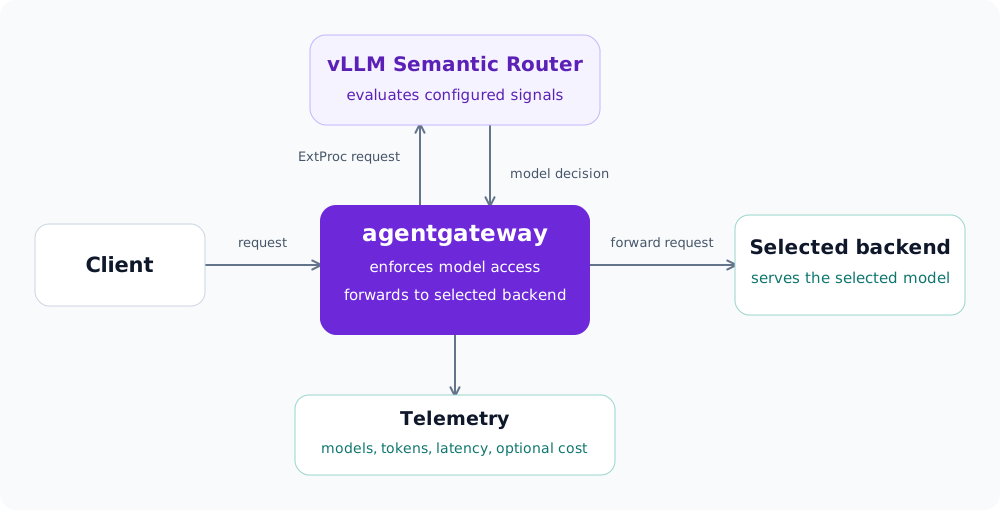
- Process the request: A client sends an LLM request to agentgateway, which calls vSR as an external processor (ExtProc) before model selection.
- Select a model: vSR evaluates its configured signals, such as prompt content or caller tier, and returns a processing response that updates the request’s
modelfield. - Forward the request: Agentgateway uses the selected model to choose a configured backend, applies gateway policies such as model authorization, and forwards the request for inference. Agentgateway records usage and latency for observability.
When response caching is enabled, vSR can return a cached completion through ExtProc, allowing agentgateway to respond without calling the backend.
Choose an integration path
Use the following guides and examples to configure the integration.
Follow the example README to configure credentials, start the containers, send requests, and clean up.
To request an additional integration example, create an issue in the agentgateway repository and describe your use case.
Integration considerations
Client model selection: The examples use
model: "auto"to opt in to semantic selection. This value is an example policy convention, not a reserved agentgateway model. If clients can request models explicitly, enforce model entitlements in agentgateway as well as in vSR decisions.Backend choice: vSR can select models served by hosted providers or self-hosted inference workloads. Configure the corresponding LLM provider or routing backend in agentgateway.
Model names: Keep the names returned by vSR aligned with the models in your agentgateway routes, provider configuration, and cost catalog.
Trusted tier context: The single-runtime examples use caller-supplied user ID and tier headers to demonstrate routing, not authentication. Before exposing them to users, validate identity and bind those headers to trusted entitlements before ExtProc runs. API key authentication alone does not verify a caller-supplied tier.
Cost and observability: vSR makes the semantic decision. Agentgateway remains the source for completed-request telemetry and can calculate realized cost when you configure a model cost catalog. Use LLM metrics and logs to evaluate the result.
Before a broad rollout, compare routed traffic with a fixed higher-capability-model baseline. Confirm that the policy uses the intended model tiers, then evaluate task completion, user feedback, retries, and escalation rates alongside cost and latency.
Response cache examples
The response-cache overview explains cache hits, misses, and a four-request verification walkthrough shared by both deployments. These examples were tested with agentgateway v1.6.0 and pin vSR v0.4.0. Follow each deployment README for its version pins and ExtProc processing modes.
Both examples use the published HomeHub support demo, which returns fixed product-support answers without calling an LLM provider. No LLM credentials or local backend image build are needed. On a miss, agentgateway calls HomeHub and passes its response through vSR to store it in Redis. On a hit, vSR returns the cached completion through ExtProc and HomeHub is not called.
The examples send stream: false Chat Completions requests. This client setting is independent of ExtProc body processing: requests use FullDuplexStreamed, while responses use Buffered so vSR can cache the complete JSON response. Use a unique X-Request-ID for each request to correlate cache lookup with response storage. Verify hits with the x-vsr-cache-hit response header and an unchanged HomeHub backend request count.
Response caching in production
The response-cache examples use fixed, public answers and a single Redis instance without authentication or TLS. When adapting them to your application, consider how cached answers are matched, who can reuse them, and how Redis data is managed.
Note
With vSR v0.4.0, each request must include a unique X-Request-ID so vSR can associate the request with its response and store it in the cache. Generate the ID in your client before sending the request. For example, add -H "X-Request-ID: $(uuidgen)" to a curl command.
Adding the header through an llm.policies transformation is too late for this integration: ExtProc runs before that transformation.
Cache correctness
Test the similarity threshold with representative questions, including similar questions that require different answers. For example, questions about HomeHub X2 and X3 might match even though their reset instructions differ. The examples use 0.70 to demonstrate paraphrase matching, so choose a threshold based on your own data.
Use scope: global only for answers that every caller may read. For personalized responses, choose an appropriate cache scope and derive caller identity from trusted authentication data. Set a cache lifetime that reflects how often answers change, and plan how to invalidate stale entries. See the vSR response-cache documentation for modes, scopes, and expiration settings.
Protect access
Restrict network access to vSR and Redis, enable Redis authentication, and use TLS between agentgateway and vSR and between vSR and Redis. Keep credentials in a secret store, such as Kubernetes Secrets. See Redis security.
Redis operations
Size Redis memory and storage for cached responses, embeddings, retention time, and write volume. Decide how much cache loss or downtime the application can tolerate, then configure persistence, replication, failover, and backups accordingly. The Kubernetes PVC and standalone Compose volume preserve Redis data across restarts but do not provide high availability. See Redis persistence for durability and backup options.